
Parivahan Sewa & Sarathi Parivahan Guide
The Parivahan Sewa portal is begin started by India’s Ministry for Road Transport and Highways (MoRTH).This is the one of the the online platform which make it easy to understand any handle everything related about your vehicle. Many of these task are performed by the Parivahan, are now just a few click away.
Parivahan Sewa is government portal that provide wide information about online vehicle related services all over the India. That is make things easier whether you need to registered a vehicle, renew your license, pay taxes, or look up RC details this make the whole process quick and effortless.
License Related Services
Using this platform you can book your appointments,replace a lost license, checking your application or taking the learner’s test.


Driving School
Apply for a Driving School License in one
place.

Online Test/Appointment
Book or modify your
online test appointments.



Vehicle Related Services
you can easily manage everything related your vehicle registration: appointments, status checks, replacements, address changes, ownership transfers, and loan details.


What does Parivahan Sewa mean?
Parivahan Sewa is digital online service created by the Indian government that help people to manage their vehicle and driving-related services online. It help vehicle owner and transport operators get important transport-related services online, so they don’t have to go to the RTO without visiting an office.
The platform links to all regional transport offices the whole country into one digital system, making the process faster, and more convenient for everyone.
Services Offered by Parivahan Sewa
Below is a detailed breakdown of what you can do:
Driving-licence services (Sarathi)
- Apply for a Learner’s Licence (LL) and a Permanent Driving Licence (DL).
- Book test/appointment for learner and driving tests.
- Renew DL, apply for duplicate DL(Lost / Damaged / Worn out).
- Change / Update DL Details — address change, new photo, adding vehicle class.
- Apply for an International Driving Permit (IDP) apply through portal (where available).
- Upload/maintain required documents (photo, signature) and check application status online.
- Print / Download DL — via portal, DigiLocker or mParivahan app.
Vehicle Registration & RC Services (Vahan)
- New vehicle registration for brand new vehicles, via VAHAN module
- Registration Certificate (RC) renewal
- Transfer of ownership, duplicate Registration Certificate (RC), change of address, and hypothecation / NOC (for loans or inter-state transfers).
- Cancellation / conversion of registration (e.g., private ↔ commercial), and vehicle scrapping workflows where applicable.
- Vehicle search / RC verification (check ownership, chassis/engine details,insurance, registration date,) and smart-card RC issuance.
- Permits (National / State / Commercial)
- Fitness Certificate — for transport vehicles
- Road tax / vehicle tax payment
- Dealer services / registration
- Fancy / VIP number allocation / bidding
Permits, Fitness & Special Vehicle Services
- Apply for national/state permits (e.g., tourist, stage carriage) and manage permit renewals.
- Road tax payments and receipts are available through the portal.
- Fancy / special number allocation and online bidding (where the state supports it).
- Fitness certificate issuance / renewal
- Services for commercial / transport vehicles, heavy vehicles
- Special handling for alternate fuel / CNG / EV vehicles (if state has provisions)
- No Objection Certificate (NOC) for shifting vehicles across states
- Register PUC centres, upload PUC certificates, and let vehicle owners view/download pollution control (PUC) status and receipts.
e-Challan, fines & Tax
- View and pay traffic challans (e-challans) online, check history and download receipts. (Many states surface challan data via Parivahan-linked services.
- Check tax dues / status
- eChallan services — check traffic violations / fines online, using DL number, vehicle number or challan number
- Dealer authorizations, CNG/LPG kit approvals, checkpost taxes, and other specialised services for transport operators.
- Integration with Aadhaar for verification (where required) and SMS/email alerts for application status.
- Pay challans online via Parivahan’s eChallan portal
- View challan history / dispute options
Fancy Number / VIP Registration Numbers
- Search available fancy / premium vehicle numbers
- Participate in online bidding / auction for special plates
- View results, pay additional fees if won
| Feature | Description |
|---|---|
| Online Portal | Parivahan Sewa is the official government online portal for vehicle service. |
| National Platform | It connects RTOs across all Indian states for license and vehicle services. |
| Key Services | Digital DL/RC via mParivahan / DigiLocker vehicle registration, eChallan— so users need not carry physical documents. |
| User Access | Accessible to all Indian citizens from anywhere: desktop web, or mobile app. |
| Main Websites | parivahan.gov.in & sarathi.parivahan.gov.in |
Digital Driving License
Parivahan Sewa is government official portal (sarathi.parivahan.gov.in) related to the vehicle online services.Select your state and you find a wide range of services.
Started with Your Driving License
- you must first get a Learner’s Licence (LL)
- Fill the LL application form online
- Upload required documents (ID proof, address proof, age proof)
- Choose your preferred test center
- Book a test slot for your learner’s exam
- Appear for the computer-based knowledge test
- Once you pass, your LL becomes available digitally.
- Permanent Driving Licence (DL). Through this portal it’s a simple process.
- Submit the DL application online
- Upload documents
- Book your driving test appointment
- Track the status of your DL
After clearing the driving test, your DL is issued and also becomes available digitally.
Making It Happen:
After your DL is approved, you don’t have to wait for the physical card.
You can:
- Download the digital version
- Print a copy for convenience
- Add it to mParivahan or DigiLocker, where it is legally valid during traffic checks
Two Main License: Learner’s and Permanent
1. Learner’s License (LL) – Your Practice Permit
- Learner license is the first step to “training wheels” license. It acts like your practice permit, allowing you to learn and improve your driving skills.
- The LL is generally valid for six months.
2. Permanent Driving License (DL) – Your Official Driving Permission
- Once you have practiced enough with your LL, the next step is the Permanent Driving License.
- This is the official license that grants you full legal permission to drive on your own.
Are You Eligible? Let’s Check
| Category | Eligibility Requirement |
|---|---|
| Minimum Age (Motorcycle without gears) | 16 years |
| Minimum Age (Motorcycle with gears & Cars) | 18 years |
| Minimum Age (Commercial/Transport Vehicles) | 20 years |
| Health Requirements | Must be physically and mentally fit to drive as per rules |
| Rule Master | Applicant must follow all applicable driving and licensing regulations |
Document Requirements
Proof of Identity
- Aadhaar card, Passport, Voter ID card, PAN Card
Proof of Address
- Aadhaar, Passport, Voter ID, recent Utility Bill (electricity / water / gas / telephone — usually within last 2-3 months), Rental / Lease Agreement (if applicable), sometimes Government-issued payslip or other state-recognized address proof.
Proof of Age
- Birth certificate, Passport, 10th-grade / school leaving certificate or other school certificate with DOB, School Transfer Certificate (in some cases), PAN Card (accepted by some RTOs), or other state-recognized age proof.
Passport-sized Photos
Recent passport-size photos (number may vary: 3–6 photos depending on state / licence type).
Learner’s License
If you’re applying for a permanent DL, you’ll need your LL.
Paying the Fees:
The amount varies, so check the Parivahan Sewa website for the latest details.
How to Apply for a Driving License?
1. Visit the Parivahan Sewa Website:
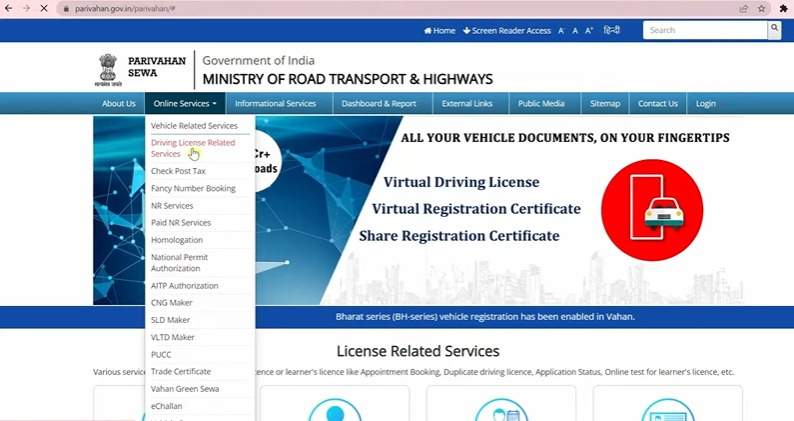
- Visit to sarathi.parivahan.gov.in.
- Choose your state.
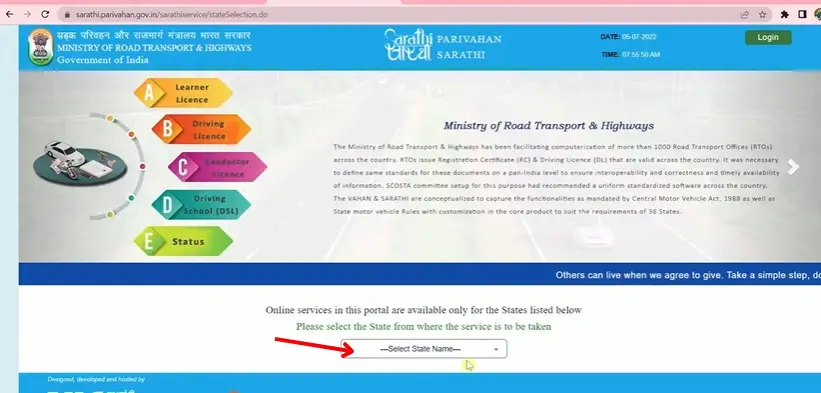
2. Apply for learner’s license
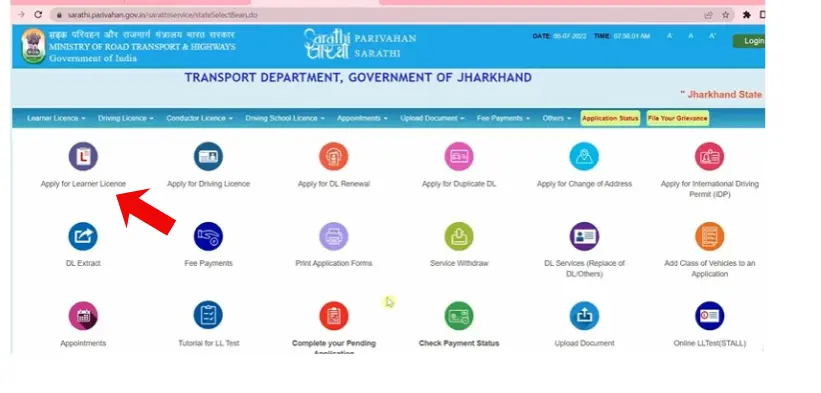
- Click on “Lerner License” and fill the application.
- Enter your personal details.
- Upload government required document.
- Pay the applicable fee.
- Online test is required during license process.
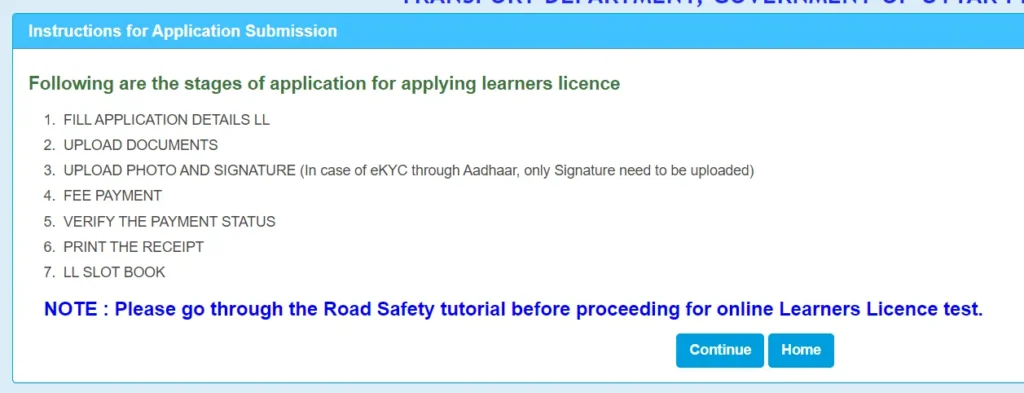
3. Learner’s License Test:
- Once you pass, your Learner’s License (LL) is generated. It is often available in digital form and can be downloaded immediately.
4. Practice Driving:
- After receiving your LL, you can start practicing driving.
- The LL is generally valid for six months, and the minimum waiting period before applying for a permanent license is usually 30 days.
5. Apply for a Permanent Driving License
- You can apply for a DL after completing the required learning period.
- Once completed, book your driving test appointment for a suitable date and time.
6. Driving Test:
- On the test day, visit the RTO with your original documents and the vehicle you will use for the test.
- A Motor Vehicle Inspector will check your driving skills.
7. Receive Your Driving License:
- If you pass the test your driving license will be issued.
- If you fail the test, you can reappear after a short waiting period by booking another appointment.
Driving Licence Fees in India
| Category | Fee (Approx.) |
|---|---|
| Learner’s Licence (per vehicle class) | ₹150 |
| Learner’s Licence Test Fee | ₹50 |
| Permanent Driving Licence Issuance | ₹200 |
| Driving Test Fee | ₹300 |
| Smart Card Fee (varies by state) | ₹200–₹250 |
| Add New Vehicle Class to Existing DL | ₹500 |
| DL Renewal (on time) | ₹200 |
| DL Renewal (after grace period) | ₹300 + penalty (if applicable) |
| Duplicate Driving Licence (lost/damaged) | ₹200–₹250 |
| International Driving Permit (IDP) | ₹1,000 |
| Change of Address on DL | ₹200 |
| Smart Card Reprint / Replacement | ₹200–₹250 |
How to Check Your Driving License Application Status?
- Visit to official Sarathi Parivahan website: sarathi.parivahan.gov.in.
- Click on “Application Status”.
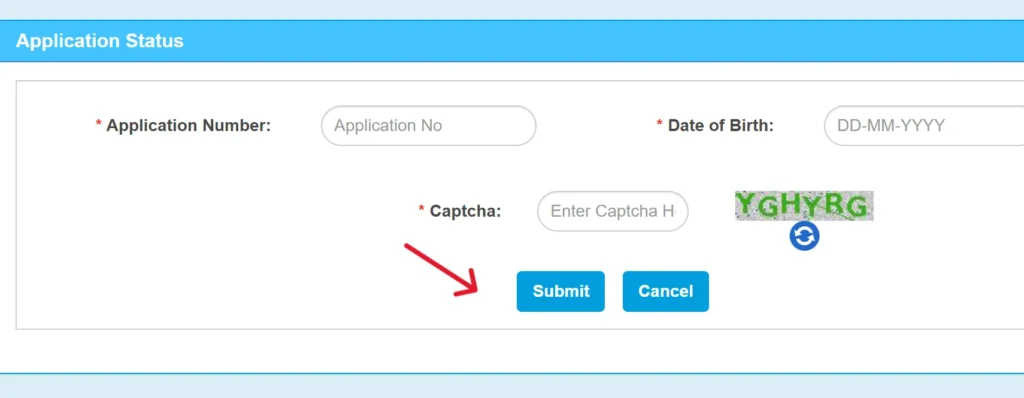
- Add the detail like (Application number, Date of Birth and Captcha).
- Click on the submit button and you seen the current status of your application.
Renewing Your License
Stay updated with your driving licence renewal. Here’s what you need to know:
1.Timing Is Important
- You should start the renewal process within one month before license expires.
- You must apply for a new driving license when your license has been expired for more than 5 years.
- If you apply for renewal after 30 days of expiry, an extra ₹30 late fee will be charged.
2. Documents You’ll Need
renew your driving license, make sure you have:
- Your current driving license
- Application Form 2
- Form 1 – Self-declaration of physical fitness (for non-transport vehicles)
- Form 1A – Medical certificate (mandatory for transport vehicles)
- The required renewal fees
3. The Renewal Process (Step-by-Step):
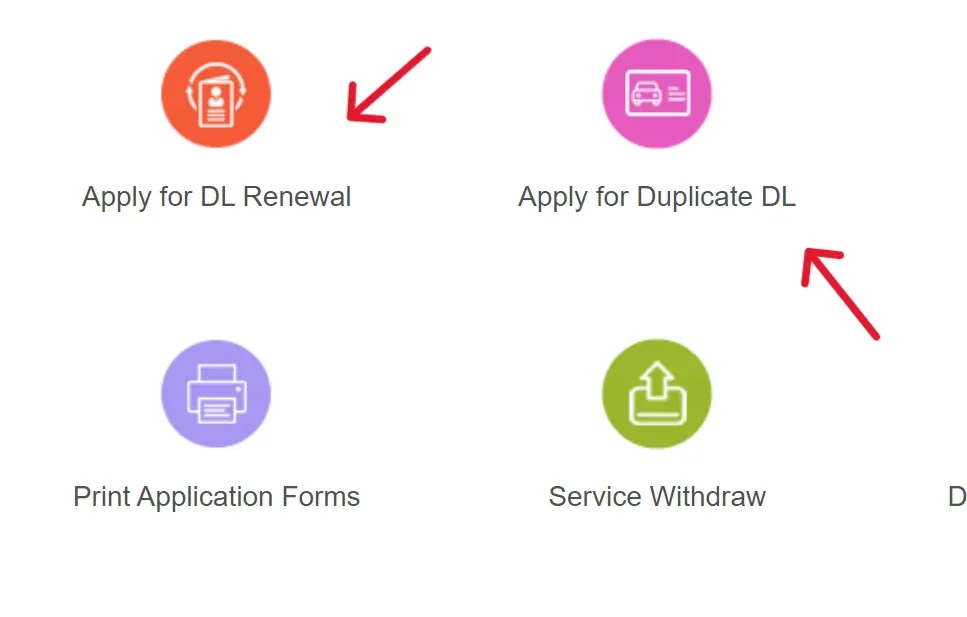
- Open the Parivahan Sewa website parivahan.gov.in.
- Select the “Driving Licence Related Services”.
- choose the state. Click on “Apply for DL Renewal”.
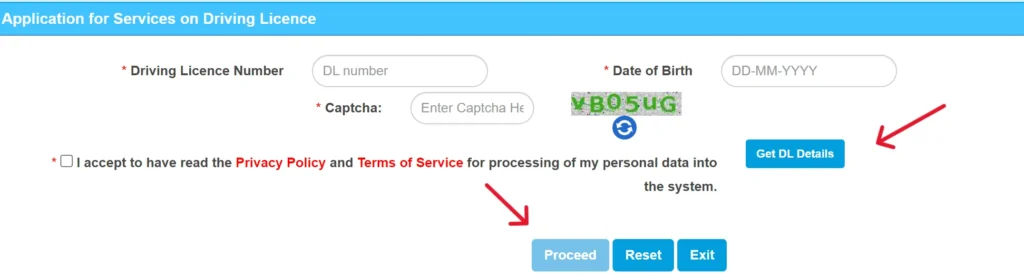
- Add your you personal details (driving license number, date of birth and the captcha code.
- Click on “Get DL Details” and choose the correct license category, RTO, and state.
- Upload all the required documents such as address proof, age proof, and passport-sized photos.
- After submitting your online form, visit your local RTO Vehicle Information with the original documents for verification.
- You may be required to provide biometrics (photo, signature, fingerprints) depending on your state’s process.
Duplicate Driving Licence Guide
If your driving licence has been lost, stolen, damaged, or become unreadable, you can easily apply for a duplicate DL through the portal.
When You Need a Duplicate Driving Licence
You should apply for a duplicate driving licence if:
- You want to update your photo or fix any printing issues on the licence.
- Your licence has been lost or stolen.
- Your licence is damaged, torn, or the information on it has become unreadable.
- Your licence was destroyed in an accident, fire, or any other incident.
Documents Required
Make sure you have the following:
- Application Form 2 (filled online or at RTO)
- Original damaged licence (if you still have it)
- FIR / NCR copy (only if the licence is lost or stolen — varies by state)
- Address proof (Aadhaar, voter ID, passport, etc.)
- Age proof
- Passport-size photos
- Self-declaration of fitness (Form 1) – for non-transport
- Medical certificate (Form 1A) – for transport licences
- Photocopies of the licence (if available)
- Duplicate Driving Licence Fee: ₹200–₹250
- Smart Card Fee: ₹200 (approx., depending on the state)
Duplicate Driving License Application process
- Go to Parivahan sewa official website.
- Click on “Online Services” and then “Driving Licence Related Services.” Select you state.
- Click on “Apply for Duplicate DL”.
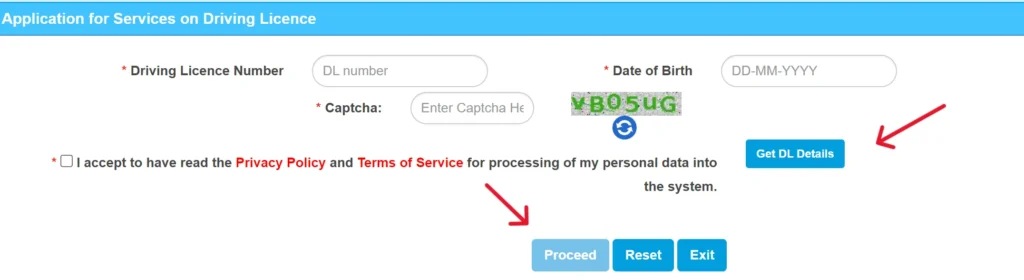
- Enter your personal details (DL number, date of birth,) then click on “Get DL Details”.
- Enter your mobile number or email address.
- Select one of them “Issue of Duplicate DL” or “Replacement of DL” and click on “Proceed”.
- Visit to to your Local RTO office for verification.
- Document Required:
- Driving License Number
- Mobile Number
- Email ID
- Payment Slip
- Slot Booking Slip
Parivahan Sewa: Vehicle Services & eChallan
You seen many vehicle related services in Parivahan Sewa portal. Follow these steps to get these services:
Accessing Vehicle Related Services (Vahan):
- Visit to Parivahan portal parivahan.gov.in.
- Click on “Online Services” then “Vehicle Related Services.”
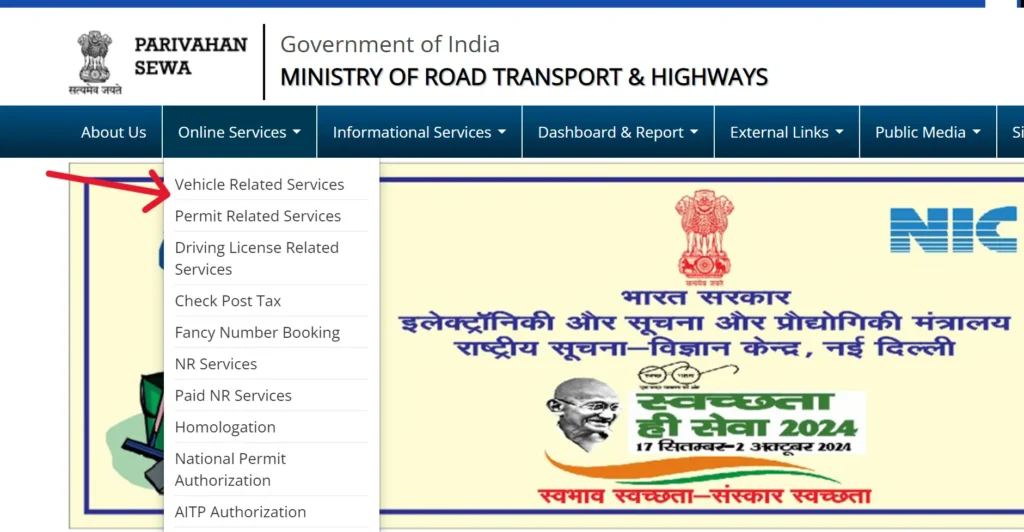
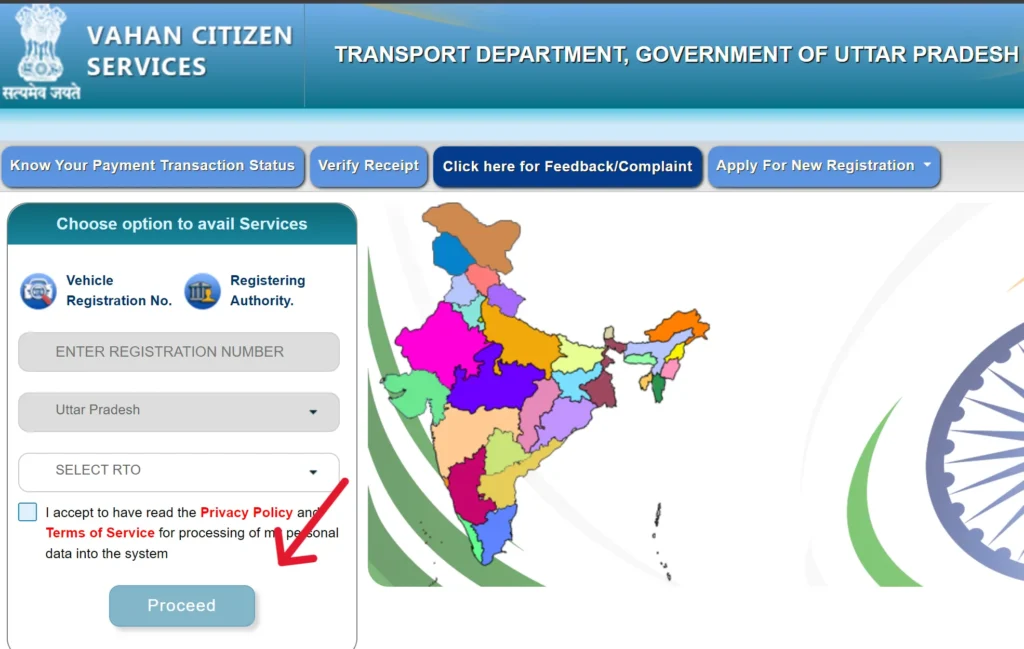
- Select your “State”. You will redirect to Vahan Citizen Services page.
- Enter Registration Number, State name, RTO.
- Click on “Proceed” button.
Managing Traffic Violations: eChallan Guide
The Parivahan eChallan system allows you to easily check, track, and pay your traffic fines online without visiting any traffic office.
How to Check & Pay Your eChallan Online
Follow these simple steps:
1. Visit the Official eChallan Portal
- Visit the Parivahan website and navigate to the eChallan section.
- You will be redirected to the official eChallan portal.
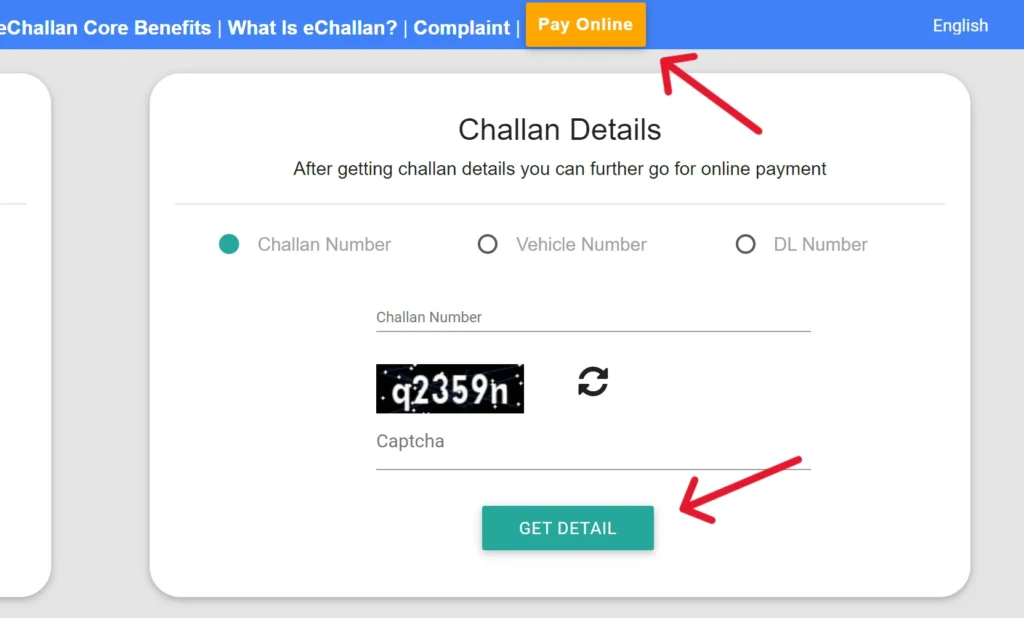
2. Open the Challan Status Page
- Go to Parivahan parivahan.gov.in.
- Click on “Check Online Services” and then select “Check Challan Status.”
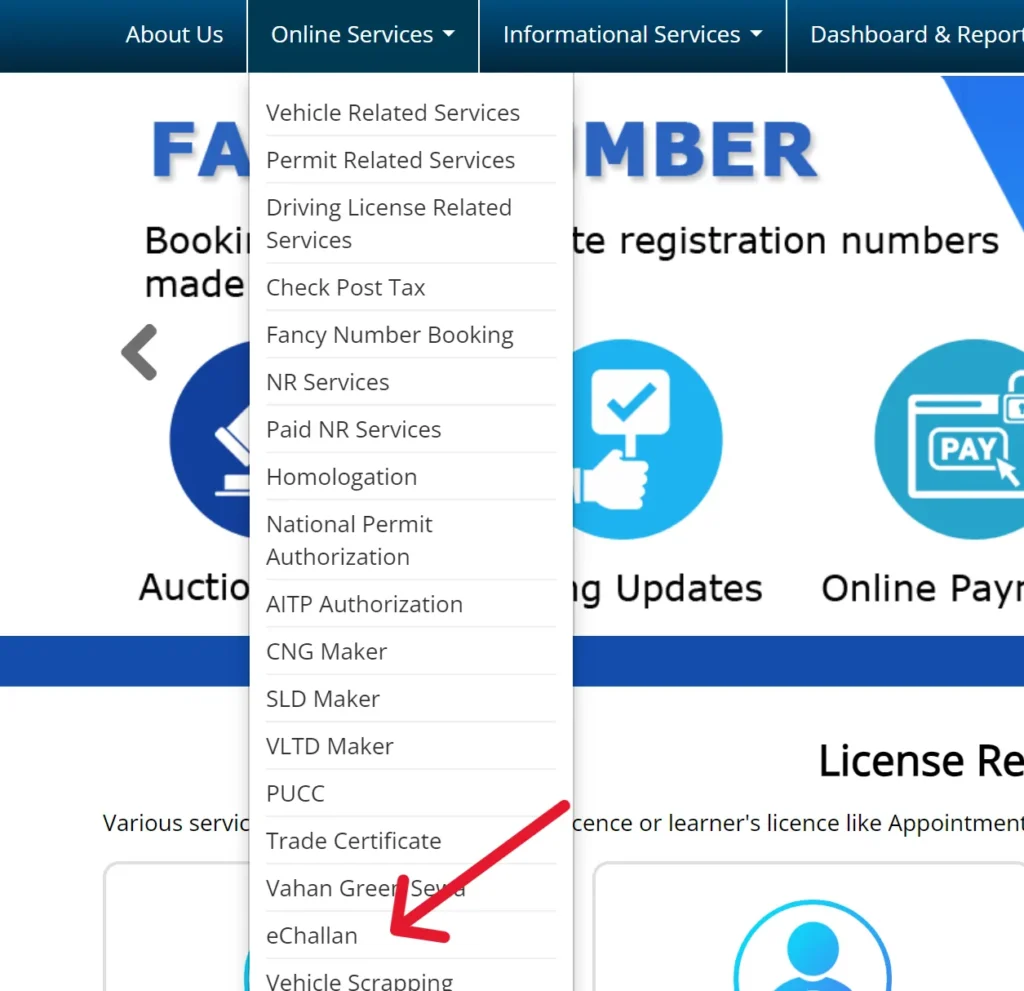
- eChallan website is opened echallan.parivahan.gov.in.
- Click on “Check Online Services” then “Check Challan Status”.
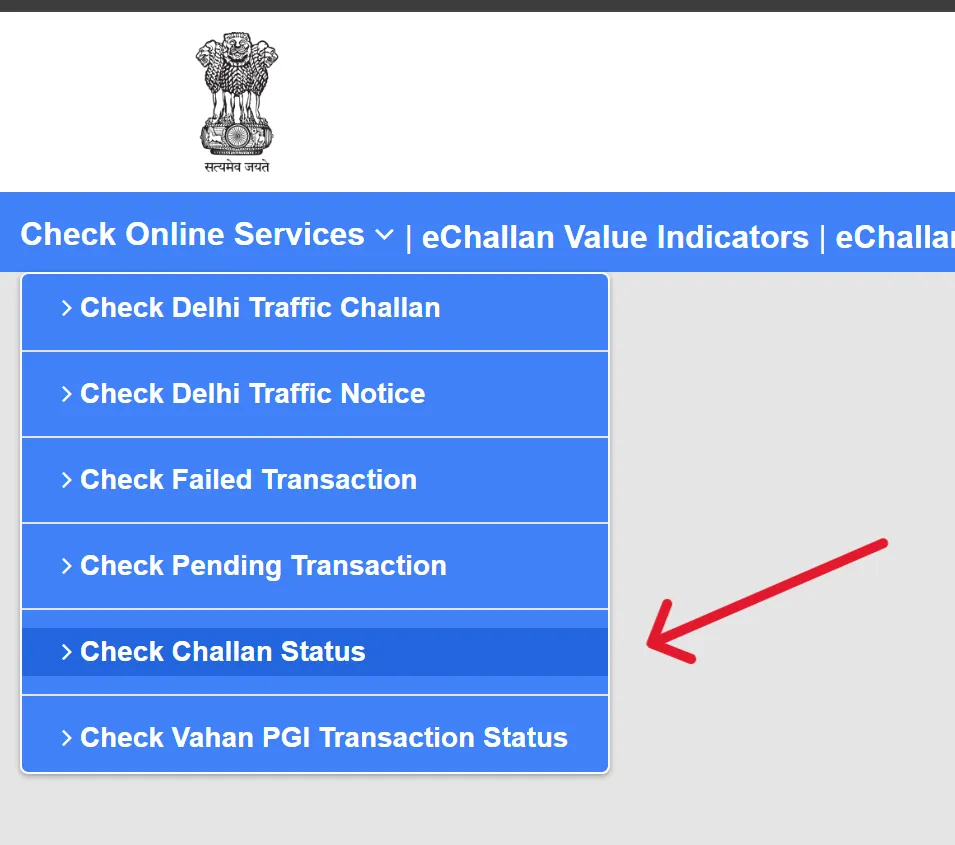
- Enter the required detail, solve the captcha, and click “Get Details.”
- View the challan and pay online.
Driving License Forms
| Form No. | Description |
|---|---|
| Form 1 | Self-declaration of physical fitness for non-transport vehicles. |
| Form 1A | Medical Certificate for transport vehicles. |
| Form 2 | Application for the grant or renewal of a driving license. |
| Form 3 | Learner’s License. |
| Form 4A | Application for the grant of a driving license. |
| Form 5 | Driving Certificate issued by a driving school or establishment. |
| Form 8 | Application for adding a new class of vehicle to a driving license. |
| Form 9 | Application for renewal of a driving license. |
Vehicle-Related Forms
| Form No. | Description |
|---|---|
| Form 25 | Application for renewal of vehicle registration certificate (RC). |
| Form 26 | Application for duplicate vehicle registration certificate. |
| Form 28 | No Objection Certificate (NOC) for vehicle transfer. |
| Form 29 | Notice of transfer of vehicle ownership. |
| Form 30 | Application for the transfer of vehicle ownership. |
| Form 35 | Application for termination of a hypothecation (loan) on a vehicle. |
Helpline Contact Information
If you encounter any issues, you can contact us using the details provided below:
| Problem | Email ID |
|---|---|
| Vehicle Registration, Fitness, Tax, Permit, Dealer | helpdesk-vahan[at]gov[dot]in |
| Learner License, Driving License | helpdesk-sarathi[at]gov[dot]in |
| mParivahan Services | helpdesk-mparivahan[at]gov[dot]in |
| eChallan Services | helpdesk-echallan[at]gov[dot]in |
FAQs
1. What services can I access on the Parivahan portal?
On parivahan.gov.in, you can access vehicle registration, driving licence services, challan payment, permits, fitness, tax payment, and more.
2. Where can I apply for a learner’s licence online?
You can apply for a learner’s licence through the Sarathi portal at sarathi.parivahan.gov.in by filling the form, uploading documents, and booking an appointment.
3. How can I verify my driving licence details?
Visit parivahan.gov.in, go to “Driving Licence Related Services,” enter your licence number and date of birth to view your DL status and details.
4. Where can I check if there is any pending challan on my vehicle?
Go to echallan.parivahan.gov.in, enter your vehicle number, DL number, or challan number to check any pending traffic fines.
5. Can I download my vehicle RC online?
Yes, you can download a digital copy of your RC through parivahan.gov.in or using connected apps like DigiLocker or mParivahan.
6. How do I apply for a No Objection Certificate (NOC) for my vehicle?
Open Parivahan Sewa, go to “Vehicle Related Services,” enter your registration number, and select the option to apply for NOC online.